
How to Edit Your Recruiting Page
SiteMVP is a mobile app. Everything in this post happens on your phone, inside the app, before a single coach sees anything. Your page is what coaches see. Before you publish it, your job is to make sure it says exactly what you want it to say, clearly, completely, and without hedging. The decisions you make in the Editor are what coaches evaluate when they open your link. Here's how to make them well.
Before you start editing

If you read What is SiteMVP, you know what the platform is. This series is about how to run it.
This post covers the Editor: every section on your recruiting page, what it's for, and how to fill it out in a way that represents you at your best. The goal isn't to get something on the page. The goal is to make sure what's on the page is accurate, current, and competitive.
Assume coaches who open your link don't know you yet. That's the best place to start editing from. Even when someone in your network shares your page with a coach who has heard your name before, the page still has to do the work of introducing you. Edit like a stranger is reading it, because most of the time, one is.
How the Editor works
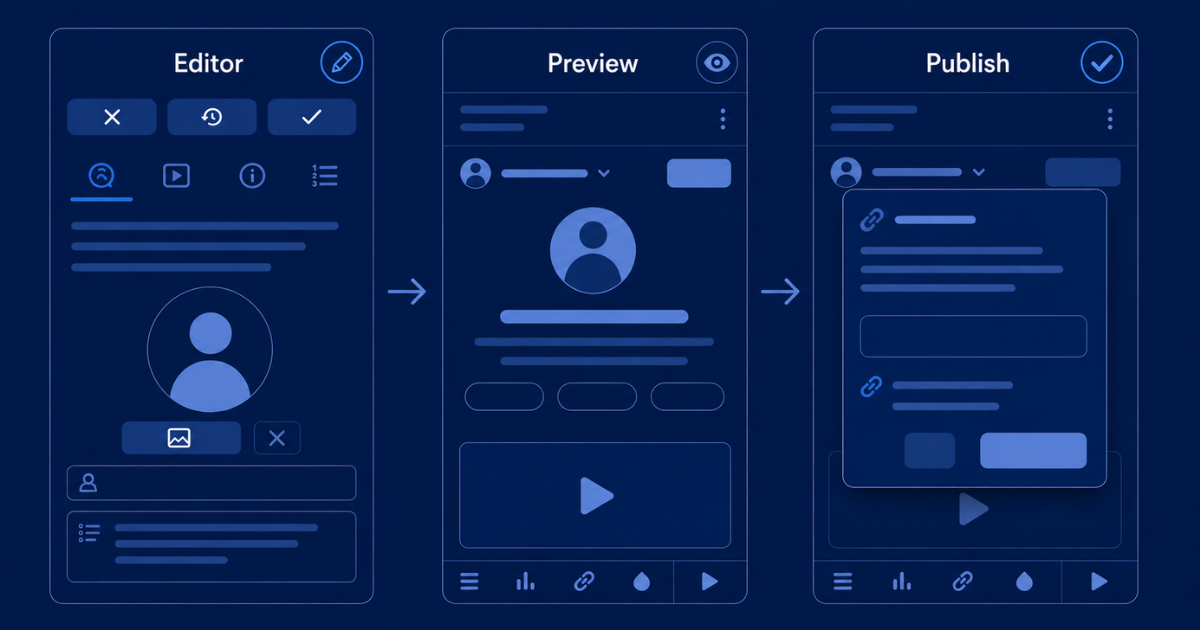
Inside the SiteMVP app, your page lives across two tabs: the Editor and the Preview.
The Editor is where you make changes. Each section of your page is editable here. When you're ready to lock in a change, you save from the Editor. Saving updates your draft. It does not publish anything. Saving and publishing are two separate actions, and nothing goes live until you choose to publish.
The Preview tab shows you exactly what your page looks like, privately, inside the app. No one else can see it. It's your view before anything goes live.
Work in the Editor. Check your work in the Preview tab. Publish when the page is ready.
Hero section
The Hero section is the first thing on your page. It includes your photo, your name, a short introduction, and your year, position, and sport. This is the first impression a coach gets before they scroll anywhere.
Your photo
Your photo is the first thing that puts a face to your name. Coaches are evaluating athletes constantly, and a clear, recognizable photo makes your page feel like it belongs to a real prospect.
The right photo is simple: a clear, well-lit shot where your face is visible. An action shot from a game or practice works if the framing is tight enough to actually see you. A clean headshot works just as well.
What to avoid: photos where you're hard to identify, group shots where you're one of five people, or anything cropped out of a screenshot.
You don't need a professional photo. You need a good one. A clear shot from your phone, good lighting, nothing distracting in the background. That's enough.
Your intro copy
Below your name in the Hero section, you write a short introduction. This is the first sentence or two a coach reads. It should tell them who you are as a recruit quickly and clearly.
Compare these two:
Weak intro:
"I'm a junior volleyball player who loves competing and working hard every day."
Strong intro:
"I'm a Class of 2027 libero from Las Vegas, NV, targeting Division I programs in the Mountain West. 4.1 GPA. Captain of my club program since 2025."
The first is filler. The second gives a coach the information they need to decide whether to keep reading. Your intro copy is your opening statement. Make sure it sounds like one.
Feature Video
Your Feature Video is the most important decision on the page.
Coaches evaluate athletes on film. Your video is why they'll keep reading after the first few seconds. Everything else on the page supports it, but the video is what they came to see.
What counts as a Feature Video
We named this section Feature Video, not Highlight Video, intentionally. Your Feature Video does not have to be a traditional highlight reel. It can be:
- A highlight reel you edited yourself or had someone create for you
- A spotlight video you paid a production company to make
- A full-length game film that shows your contributions throughout
- A personal video where you introduce yourself, talk about your game, and share your recruiting goals directly to camera
The format matters less than the quality and the intent. If a video shows a coach who you are as an athlete, it belongs here.
How to add your video
You can upload a video directly from your phone into the app, up to 10 minutes in length. That's it. You don't need a computer, you don't need to export anything to a third-party platform first, and you don't need to spend money on hosting. Pull up your video from your camera roll and upload it.
If you already have your film on YouTube or Hudl, you can link that instead.
Either works. But for most athletes, uploading directly is the fastest path from video to published page.
Choosing the right video
If you only have one video and it's your best available film, use it.
If you have multiple options, ask yourself where you are in your recruiting. Early in the process, your best move is often the most current film, even if it isn't your most polished. Coaches recruiting you in your freshman or sophomore year understand they're looking at a player in development. Show them the real you, not a version from a year ago that no longer represents where you are now.
Later in your recruiting, the calculation shifts. By junior or senior year, you want film that shows your best performances at the most competitive level you've played. When in doubt, go with the film that shows you competing at the highest level you've reached.
A few principles for putting together a strong highlight reel
If you're creating or refreshing a highlight reel, start with your best full-length games. Pull clips across all your key skills, then cut hard.
A five to six minute reel, sequenced intentionally by skill type, is stronger than ten minutes of unfiltered footage. Open with a one-minute overview of your absolute best plays. That first minute is what earns the rest of the watch. Coaches aren't always going to sit through everything. Give them a reason to.
We'll go deeper on the full highlight video creation process in a future post.
When to update it
Your Feature Video isn't permanent. Your page stays live at the same URL, so when your film gets better, update it. Everyone who opens your link going forward sees the new version.
A strong tournament, a new highlight reel, a skills session that shows something your current video doesn't. Those are all reasons to update. Treat your Feature Video like your current best answer to the question: what does this athlete look like right now?
Overview section
After the video, the page moves into the Overview section. This is where coaches learn who you are beyond the film. If a coach is still on your page after watching your video, they want to know more. The Overview is where you keep that momentum going.
The Overview has two parts: About and Measurables. The app walks you through the required fields. What to focus on here is the copy you write around those fields, because that's where you control the story a coach takes away.
Writing your Overview copy
The copy in your Overview section is where you say who you are and what you're after. Coaches want to know what drives you and where you fit into their program. Share what kind of player you are, what you're trying to accomplish athletically, and what you're looking for academically at the next level.
Write like a coach who has never heard of you is reading it. Because most of the time, they haven't.
Don't hedge. If you're targeting Division I programs, say so. If you're open across all levels, say that. If you have a specific conference or region in mind, say it. Coaches want to know quickly whether there's a fit worth pursuing. Give them that directly.
Compare these two:
Weak overview:
"I'm hoping to find opportunities at the college level and see where things go."
Strong overview:
"I'm a Class of 2027 point guard targeting Division I programs in the Mountain West and Big 12. High-level defender, 3.8 GPA, committed to playing immediately and studying kinesiology."
The first gives a coach nothing to work with. The second tells them what they need to know to decide if it's worth a conversation.
Claim your goals. A coach who reads clear, specific intent takes you more seriously than one who reads a vague paragraph about seeing where things go.
Section headings and subheadings
Throughout your page, you write the headings and subheadings for each section. These aren't labels the app fills in for you. They're your words, and they matter more than most athletes realize.
Think about how a good post on social media works. The hook is the first line, the thing that makes you stop scrolling. Your section heading is that hook. It's the first thing a coach reads before they engage with what's underneath. If the heading doesn't make them want to keep going, they might not. Your job is to write headings that pull them forward, the same way a strong caption pulls someone into a post.
Each section of your page is a chapter of your story. The heading is what tells the reader what kind of chapter they're about to read. Don't waste it on a label.
Here's what that looks like in practice:
Weak heading:
"My Stats"
Strong heading:
"Four seasons of competing at the highest club level in the state"
Weak subheading:
"Track and field results"
Strong subheading:
"Two-time state qualifier in the 400m and 4x400 relay, competing for a Division I scholarship"
One version tells a coach what they're about to see. The other tells them what to think about it before they see it. Write the second version, every time.
Stats and Achievements
Your Stats and Achievements sections are where the factual record of your athletic career lives. Numbers, awards, honors, and milestones. This is what coaches use to evaluate your production and compare you to other recruits.
Stats
Include what's current and what's competitive. That doesn't mean only your best numbers. It means the numbers that accurately represent where you are right now. Make it clear what level you competed at and what timeframe the numbers cover.
As you're filling in your stats, think about the programs you're reaching out to and what matters to them. Your page can hold whatever your sport needs. A volleyball coach evaluating a libero wants to see digs per set, passing efficiency, and reception percentage. A basketball coach evaluating a guard wants to see scoring, assists, and shooting efficiency. Write your stats with your audience in mind, not just the numbers you happen to have available.
Achievements
Include honors, awards, and milestones that are meaningful and verifiable. All-conference, all-region, all-state, academic honors, team leadership roles. Recognition from others gives coaches more proof that they can trust what the rest of the page says about you.
Academic achievements belong here too. If you've earned honor roll, academic awards, or carry a strong GPA, put it in front of coaches, especially at programs where academic fit is part of the evaluation.
Keep everything current
Your Stats and Achievements are only useful if they're accurate. After each season, each major tournament, or any time something meaningful changes, come back and update. A page that shows stats from last year when you're in the middle of a new season creates questions you don't want coaches asking.
Contact section
At the bottom of your page, there's a contact form. Coaches can use it to reach out to you directly.
The reason it's there is specific. As your page gets shared through your network, it will sometimes end up in front of coaches you've never had a direct introduction to. A club coach shares it with a college program they have a relationship with. A family friend forwards it to someone they know. That page lands in front of a coach who doesn't have your number or your email, but is interested enough to reach out.
The contact form gives them a way to do that without your personal contact information getting passed around. You don't have to hand your phone number to everyone your page reaches. Coaches who are serious about connecting will use the form, and you get their message in your activity feed.
It's not the primary way recruiting conversations start, but it's how the ones you didn't see coming can begin.
Your Pre-Publish Checklist
Before you publish, use the Preview tab. It shows you exactly what coaches will see when they open your link, optimized for mobile since that's how most people open it. Once your page is published, it's fully responsive across desktop, laptop, tablet, and any device. But preview in the app first, and go through this checklist before you go live.
- Photo: Clear, identifiable, current. No group shots or cropped screenshots.
- Feature Video: Loads correctly. Represents your current level of play. Right video selected.
- Hero intro copy: Specific and direct. Position, class year, goals stated clearly. No filler.
- Overview copy: Accurate and honest. Goals stated. Not hedged. Written for a coach who doesn't know you.
- Section headings: Written as statements, not labels. Each one earns the scroll.
- Stats: Current season. Right level of competition noted. Audience-appropriate.
- Achievements: Accurate and verifiable. Academic achievements included if relevant.
- Measurables: Height, weight, GPA are current. No placeholders.
- Contact section: Present and visible at the bottom of the page.
- Overall feel: Read every section like a stranger. If something feels off, fix it before you publish.
Publish when everything on that list has a real answer.
Your page is what coaches see
Everything you do in the Editor, every photo you choose, every word you write, every stat you include, is what coaches evaluate when they open your link.
The campaign starts with getting the page right.
When you're ready to publish your page and start sharing it, Post 2 (coming soon) in this series covers exactly that: what publishing does, what it unlocks, and how to put your page in front of the right people.
Download SiteMVP and start editing your recruiting page for free. No subscription required to create, edit, and preview.